Your COO has approved the move. Facilities is focused on floor plans, HR is managing employee communications, and the moving company wants crate counts. Then IT gets pulled in and asked a dangerous question: “Can you handle the tech side?”
A nationwide office relocation isn’t a furniture project with extra cables. It’s a business continuity, security, and compliance project with trucks attached. The companies that handle it well start treating data-bearing assets, decommissioned equipment, and chain-of-custody as core workstreams before the first packing label gets printed.
Framing the Monumental Task of a Nationwide Move
Headquarters and office moves aren’t rare edge cases anymore. Between March 2022 and March 2023, 593 U.S. public companies relocated their headquarters, a 29% increase from the previous year and the highest annual total in seven years. In peak years, corporate moves can exceed 1,000 annually, which is a useful reminder that relocation pressure is now part of mainstream corporate operations, not an exception, according to this corporate move analysis.

Most relocation plans still over-index on visible assets. Desks, chairs, conference rooms, signage. The harder problems sit in racks, closets, branch offices, storage rooms, and employee hands. A retired firewall with an old config. Laptops assigned to terminated users. Printers with onboard storage. Backup devices nobody documented correctly.
That’s where office relocation projects usually break. Not at loading docks. At the point where asset ownership, data destruction, and disposition decisions were postponed too long. A disciplined office relocation process for IT assets closes that gap early.
What actually hangs in the balance
A multi-state move forces three decisions on every asset:
- Move it because the business still needs it.
- Retire it because the equipment is obsolete, unsupported, or too expensive to move.
- Recover value if the hardware still has secondary market value.
Those decisions affect insurance, staffing, truck space, cutover timing, security controls, and compliance evidence.
Practical rule: If an asset’s final disposition isn’t decided before move week, somebody will make that decision under pressure. That’s when custody breaks and documentation goes missing.
What works and what fails
What works is simple, even if execution isn’t. Separate relocation from disposition. Track custody from room to truck to dock to final processing. Assign one owner for data-bearing devices. Force signoff on exceptions.
What fails is the common shortcut: “We’ll sort out the old gear after we’re settled in.” That approach creates orphaned hardware, uncertain data status, and a cleanup phase nobody budgets for.
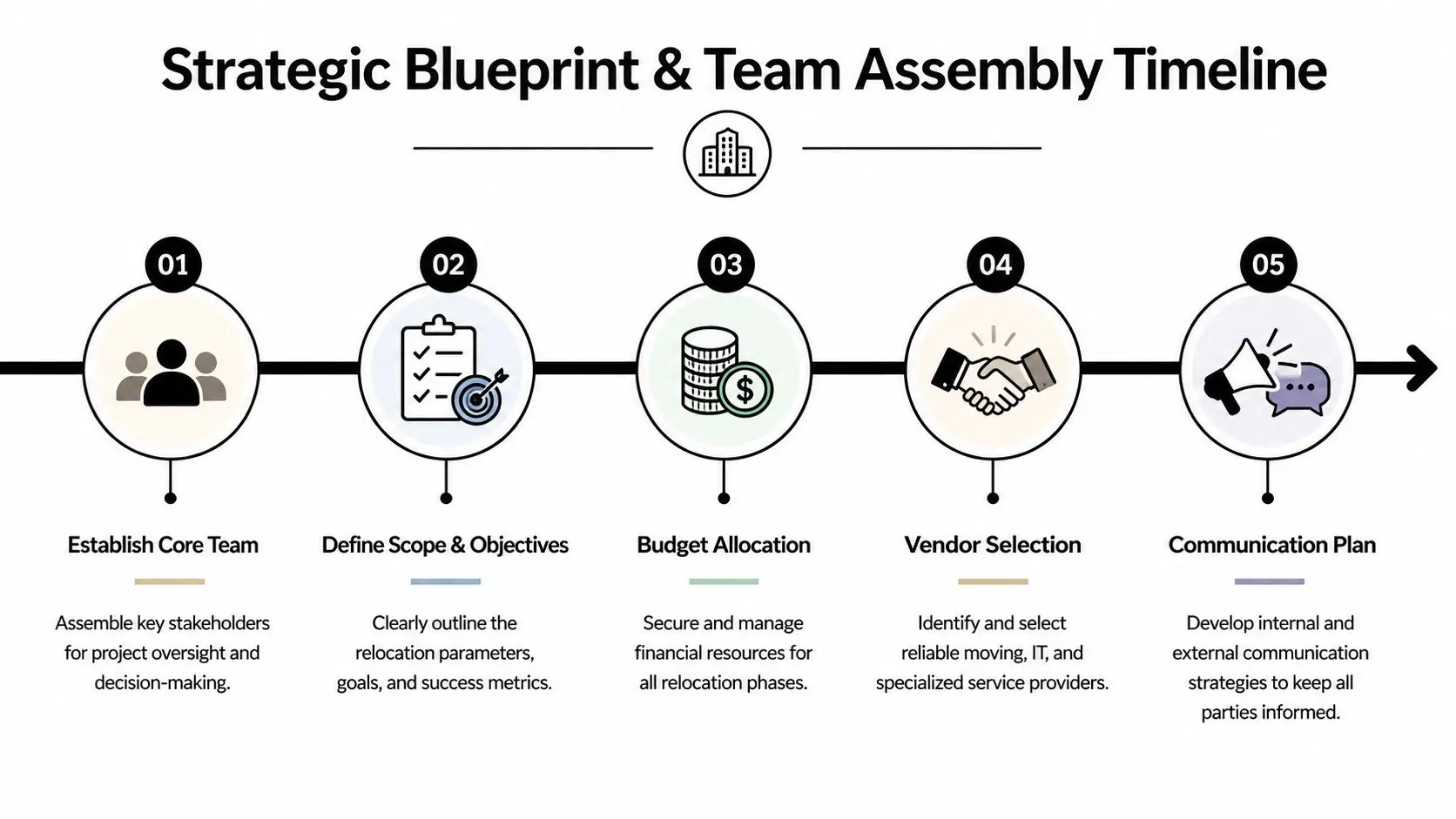
Phase One The Strategic Blueprint and Team Assembly
The move starts months before equipment is touched. If leadership is relocating because of footprint changes, labor strategy, or return-to-office pressure, IT has to be in the first meeting, not the tenth. Recent trends tied to the “Great Re-Relocation” and accelerating RTO mandates are pushing cross-state moves and office downsizing. One example cited in this RTO and relocation report is Nationwide ending its 100% remote work policy in 2025, which required a full reassessment of office and IT infrastructure needs.
Put the right people in the room
A relocation steering group should include:
- Facilities leadership to control site access, loading schedules, floor plans, and landlord obligations.
- IT infrastructure to own network, servers, telecom, endpoint planning, and cutover sequencing.
- Security and compliance to define handling rules for data-bearing assets and regulated records.
- Procurement and finance to approve vendors, resale terms, disposal scope, and insurance decisions.
- HR and operations to map user readiness, departmental timing, and business disruption windows.
A lot of teams make the mistake of treating IT as a dependency list. It should be treated as a design authority.
Define scope before vendors define it for you
Before asking for quotes, lock these decisions:
| Decision area | Questions to answer |
|---|---|
| Site strategy | Are you consolidating, downsizing, or reopening a larger footprint? |
| Asset strategy | Which systems relocate, which get refreshed, which are retired? |
| Business continuity | What must stay online until cutover, and what can tolerate downtime? |
| Compliance handling | Which assets require wiping, shredding, or documented destruction? |
| Closeout obligations | What must be removed from the old site before lease surrender? |
If you skip this step, every vendor fills in the blanks differently. That leads to mismatched assumptions and change orders.
Budget for the unseen work
The budget usually captures movers, furniture, and telecom. It often misses serial-number audits, secure storage, hard drive destruction, after-hours de-installation, and final documentation. Those are the tasks that protect the organization when legal or audit teams ask what happened to equipment removed from the old site.
A good planning checkpoint is to run every provider through a formal vendor due diligence checklist for ITAD and logistics. If a vendor can’t explain custody controls, proof of destruction, or escalation paths, they shouldn’t be handling enterprise hardware.
The best relocation teams don’t just ask who can move equipment. They ask who can prove where it was, who touched it, and what happened to the data.
Phase Two The Comprehensive IT and Asset Intelligence Audit
An inventory list isn’t enough. You need asset intelligence. That means knowing what the item is, where it is, what data it may hold, who owns it, whether it should move, and what the approved end state is.

Build three disposition buckets
Every audited asset should land in one of these groups:
Relocate
Production servers, active switches, critical workstations, specialized lab systems, conference room gear still in service.Retire
Unsupported laptops, damaged monitors, failed storage arrays, old printers, decommissioned telecom gear, surplus peripherals.Resell or recover
Newer business-class endpoints, usable network equipment, recent servers, and standardized devices with residual value.
This classification drives labor, packaging, truck routing, sanitization method, and project timing.
Audit beyond the obvious hardware
The cleanest audits go wider than the server room. Include:
- Data-bearing office devices such as copiers, MFPs, printers, and conference room systems.
- Closet and branch gear including firewalls, access points, switches, and backup appliances.
- Loose media and spares like drives, tapes, docking stations, loaner laptops, and boxed replacements.
- Software and license ties where hardware retirement may trigger reassignment work.
- Department-owned exceptions that never made it into a central CMDB.
For legal, finance, healthcare, and government environments, documentation quality matters as much as the count. Teams using contract review workflows or innovative legal technology solutions often benefit from aligning lease, records, and disposal obligations before de-installation starts.
What the audit record should capture
A usable audit file includes more than model and serial number. It should record location, owner, asset condition, final disposition, data sensitivity, and whether special handling applies. If the item is marked for retirement, assign the destruction method and expected certificate trail at the same time.
A wall-to-wall audit should answer one operational question for every asset: “What exactly happens to this item next?”
For teams trying to mature this process beyond a one-time move, a formal IT asset lifecycle management approach keeps relocation decisions aligned with refresh cycles, lease returns, and compliance policies.
Phase Three The Execution Playbook for Logistics and Disposition
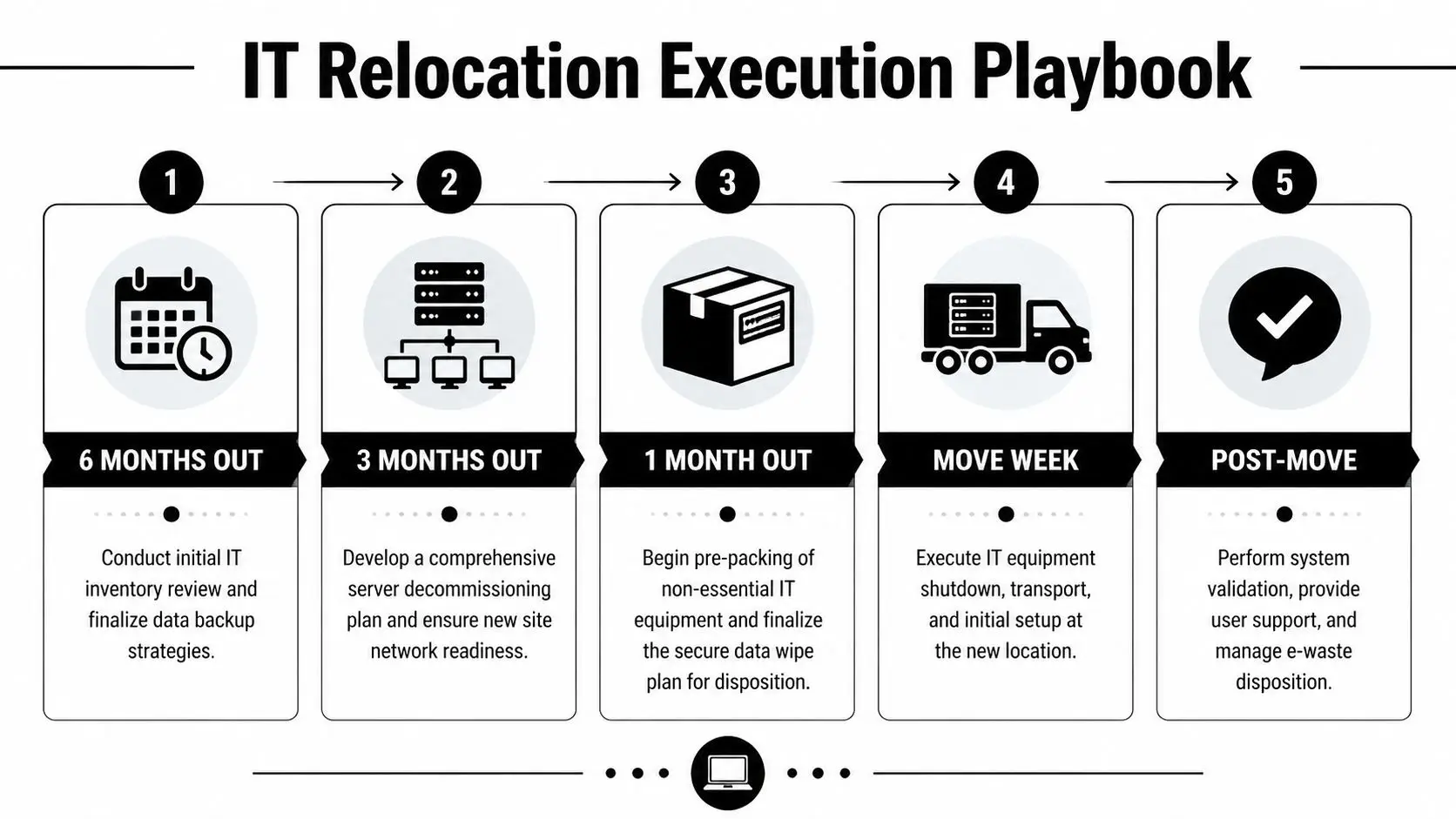
The execution phase is where planning either compounds or unravels. A structured IT relocation method matters because timing decisions are tightly linked. According to this relocation planning framework, the core milestones are clear: at 6-5 months pre-move, conduct an infrastructure audit; at 4-3 months, issue RFPs for ITAD vendors for secure wiping or shredding; at 2-1 months, test the new site and schedule asset destruction. Following a structured plan boosts on-time completion to 85-90%, versus 60% for ad-hoc approaches, and helps avoid 15-30% budget overruns that affect 80% of moves when IT planning is weak.
Six to five months out
Start with infrastructure mapping. Confirm what must remain live, what can be staged, and what should be retired before the move. This is also the right time to define recovery priorities and identify systems that need parallel cutover rather than a hard switch.
The strongest teams also freeze ad hoc hardware disposals during this period. If equipment leaves the site without entering the move plan, your inventory immediately stops being trustworthy.
Priority actions:
- Lock the asset register so every move, swap, and retirement is tracked.
- Map business-critical systems to departmental dependencies and cutover windows.
- Identify decommission candidates early so obsolete assets don’t consume move labor.
- Set handling rules for storage media, encrypted devices, and restricted equipment.
Four to three months out
This is vendor selection season. By now, you should know whether you need one integrated partner or separate firms for transport, de-installation, shredding, and recycling. If you split the scope, define custody handoffs in writing. Verbal assumptions don’t survive move week.
Use procurement to test vendors on operational specifics, not marketing language. Ask how serialized pickups are documented, how exceptions are escalated, how drives are segregated, and when certificates are issued.
What non-negotiable vendor answers sound like
| Topic | Strong answer | Weak answer |
|---|---|---|
| Chain-of-custody | Serialized logging with documented handoffs | “We track everything internally” |
| Data destruction | Method tied to media type and compliance need | “We wipe drives” |
| De-installation | Named crews, scheduling, labeling, shutdown process | “Our team can handle it” |
| Value recovery | Itemized reporting by asset category | “We may offer credit later” |
| Final documentation | Certificates, recycling records, reconciliation reports | “We provide paperwork on request” |
If the project spans many locations, use a provider with proven nationwide white glove asset recovery services so pickup standards stay consistent from one office to the next.
Two to one months out
Now the focus shifts from strategy to pre-execution control. Test the new site. Confirm carrier handoffs. Verify rack layouts, power, access control, patching, and room readiness. Don’t assume the new office is “IT ready” because construction is nearly complete.
This is also the right window to decide sanitization by asset type:
- Certified data wiping fits devices that will be reused or resold, provided the media and risk profile support logical sanitization.
- Physical shredding is the better choice when the organization needs finality, damaged media won’t wipe cleanly, or compliance expectations are stricter.
- Method assignment should happen before pickup, not on the dock.
If a drive’s fate is still undecided when trucks are being loaded, you’re already late.
Move week
Move week should feel boring to leadership. That’s the goal. The teams on the ground are working from a tightly controlled script:
- Shut down systems in the approved order.
- Confirm labels against the move manifest.
- Separate relocate assets from retire assets physically, not just on paper.
- Load by destination and priority.
- Record every custody transfer.
Avoid mixed pallets. Avoid unlabeled carts. Avoid letting “temporary staging” become an uncontrolled pile of equipment in a hallway or freight area.
For data center and MDF/IDF work, assign dedicated technical crews. General movers shouldn’t be disconnecting production hardware, tracing uplinks, or deciding which rails and power supplies belong together.
Post-cutover disposition
After critical systems are up, finish the retirement stream fast. Retired equipment left sitting at the new office becomes a second unmanaged warehouse. That creates confusion over ownership and data status.
Use the disposition phase to close three loops:
- Security loop with destruction evidence and reconciliation.
- Financial loop with resale or buyback reporting where applicable.
- Sustainability loop with recycling documentation and final processing records.
A good project plan treats retired hardware as a same-project deliverable, not “future cleanup.”
Phase Four Proactive Risk Mitigation and Bulletproof Compliance
Risk mitigation isn’t a separate lane beside logistics. It runs through every handoff. The office relocation guides many teams read still emphasize real estate and HR, while underweighting IT asset disposition and data security. As noted in this analysis of office relocation gaps, they rarely explain certified data destruction, on-site shredding logistics, FTC Disposal Rule obligations, or the role of Certificates of Destruction in transferring liability.

The lost hard drive test
If one hard drive goes missing during a nationwide office relocation, what can you prove?
Can you show where it was logged out? Who packed it? Which truck it entered? Whether it was wiped before transport? Whether it was shredded later? If the answer depends on memory, email threads, or a vendor saying “we’re looking into it,” the organization is exposed.
That’s why chain-of-custody is your primary defense. A documented custody trail turns a vague incident into a verifiable sequence.
Compliance has to be operational
Compliance-heavy sectors often treat policy as the control. In relocation work, policy only matters if it appears in field procedures. That means:
- Serialized records for data-bearing assets.
- Restricted access to staging and loading zones.
- Approved sanitization methods tied to asset categories.
- Certificates and manifests collected as part of project closeout.
- Escalation rules when assets are damaged, unlabeled, or discovered late.
For media sanitization standards, teams should align their procedures with NIST SP 800-88 guidance for data destruction, then map those requirements into vendor instructions and internal approvals.
Documentation isn’t overhead. It’s what lets counsel, compliance, and leadership confirm that a retired asset is no longer a live risk.
Questions worth asking before pickup day
Ask every provider these questions in writing:
- Who signs for custody at each handoff?
- How are assets segregated by disposition type?
- What happens when a serial number doesn’t match the manifest?
- When are certificates issued, and in what format?
- How are exceptions reported the same day?
A provider that answers clearly is usually operating clearly. A provider that answers in broad promises is usually leaving details to the field.
Phase Five Post-Move Validation and Final Documentation
The move isn’t done when users can log in. It’s done when every relocated asset is reconciled, every retired asset is documented, and every exception is closed.
Start with the physical reconciliation. Match received equipment against the approved move manifest. Anything missing, substituted, or discovered in the wrong room should be investigated immediately while crews, dock records, and transport notes are still available.
Validate the operating environment
Don’t stop at “the network is up.” Validate what matters to users and support teams:
- Core connectivity for production systems, printers, wireless, conference rooms, and telecom.
- Critical application access for finance, operations, customer support, and executive workflows.
- Room-level functionality in MDFs, IDFs, training rooms, and shared spaces.
- Support readiness so tickets from day-one confusion don’t turn into prolonged disruption.
Close the documentation loop
Your final project binder, digital or physical, should include the records that prove the relocation and disposition were controlled from end to end.
| Document type | Why it matters |
|---|---|
| Final asset reconciliation | Confirms what arrived and what did not |
| Certificates of data destruction | Proves approved sanitization or shredding occurred |
| Recycling records | Documents environmentally responsible downstream handling |
| Resale or recovery reports | Shows what value was recovered from eligible assets |
| Exception log | Captures mismatches, delays, damage, and corrective action |
Archive these records where legal, procurement, IT, and compliance can retrieve them later. A lot of organizations complete the move, then scatter the evidence across inboxes and vendor portals. That creates trouble when lease disputes, audits, internal reviews, or security questions surface months later.
One more practical step matters. Update your CMDB, fixed asset records, and support documentation to reflect the new reality. If the systems of record still show equipment at the old office, the next audit starts with bad data.
If you’re planning a nationwide office relocation and need certified data destruction, secure electronics recycling, IT buyback, or coordinated multi-site pickup, contact Beyond Surplus. They help organizations manage office moves, decommissions, and end-of-life IT securely with documented chain-of-custody and compliance-focused disposition services.