For businesses, wiping a computer hard drive is a critical security protocol, not just a cleanup task. It involves specialized software or physical destruction to permanently erase all data, making recovery impossible. This process is a non-negotiable step in the IT asset lifecycle before any equipment is recycled, resold, or discarded, safeguarding your company from significant data-related risks.
Why Secure Hard Drive Wiping is a Core Business Function
Viewing secure data wiping as a mere technical chore is a significant misstep. It is a fundamental component of corporate risk management and the final security checkpoint for any IT asset that has handled company, client, or employee data. Failure to properly sanitize hard drives can lead to severe and lasting consequences for any organization.
Retired or improperly discarded devices are prime targets for data thieves. A single un-wiped computer can contain a wealth of sensitive information, including financial statements, intellectual property, customer Personally Identifiable Information (PII), and employee records. The repercussions of such a breach extend far beyond a simple data leak.
The High Stakes of Data Negligence
When a company neglects to sanitize its retired hard drives, it exposes itself to substantial threats that can impact the entire organization:
- Costly Data Breaches: The aftermath of a breach is an expensive and complex ordeal, involving forensic investigations, credit monitoring services for affected individuals, and potentially massive legal fees.
- Severe Reputational Damage: Corporate trust is built over years but can be destroyed in an instant. A public data breach can permanently tarnish a brand's reputation, driving customers to competitors.
- Legal and Regulatory Penalties: Data disposal regulations are not mere suggestions; they are legal mandates. Non-compliance can result in crippling fines from regulatory bodies.
Meeting Compliance Mandates
Understanding these risks transforms secure data wiping from a perceived cost into a strategic investment in security. Regulations such as HIPAA, GDPR, and the FTC Disposal Rule impose strict requirements for end-of-life data management. These laws don't just recommend secure disposal—they demand it and often require verifiable proof of compliance.
Our certified secure data destruction services are specifically designed to help businesses meet these complex standards and maintain full compliance.
The global data destruction market is experiencing significant growth, valued at USD 10.17 billion and projected to reach USD 11.38 billion next year. This expansion underscores the increasing importance organizations are placing on secure hard drive wiping as regulatory pressures intensify.
Ultimately, secure data disposal is an integral part of a comprehensive asset protection strategy, which includes handling confidential information properly at all stages. For any serious enterprise, partnering with a professional IT Asset Disposition (ITAD) firm is the most reliable way to manage these requirements and guarantee total data security.
Choosing the Right Data Destruction Method for Your Assets
Selecting the appropriate method for wiping a computer hard drive is a strategic decision, not a one-size-fits-all solution. The choice depends on the drive type, the sensitivity of the stored data, and the intended future of the equipment. Your chosen method directly impacts security, compliance, and the potential for value recovery from retired assets.
The initial decision point is straightforward: Is the asset intended for remarketing, or has it reached its end of life? Answering this question is the first step toward developing a sound IT asset disposition (ITAD) plan.
This flow chart simplifies the core choice every business must make. You either proactively wipe your drives to ensure security or neglect the process and accept the significant liability associated with data negligence.
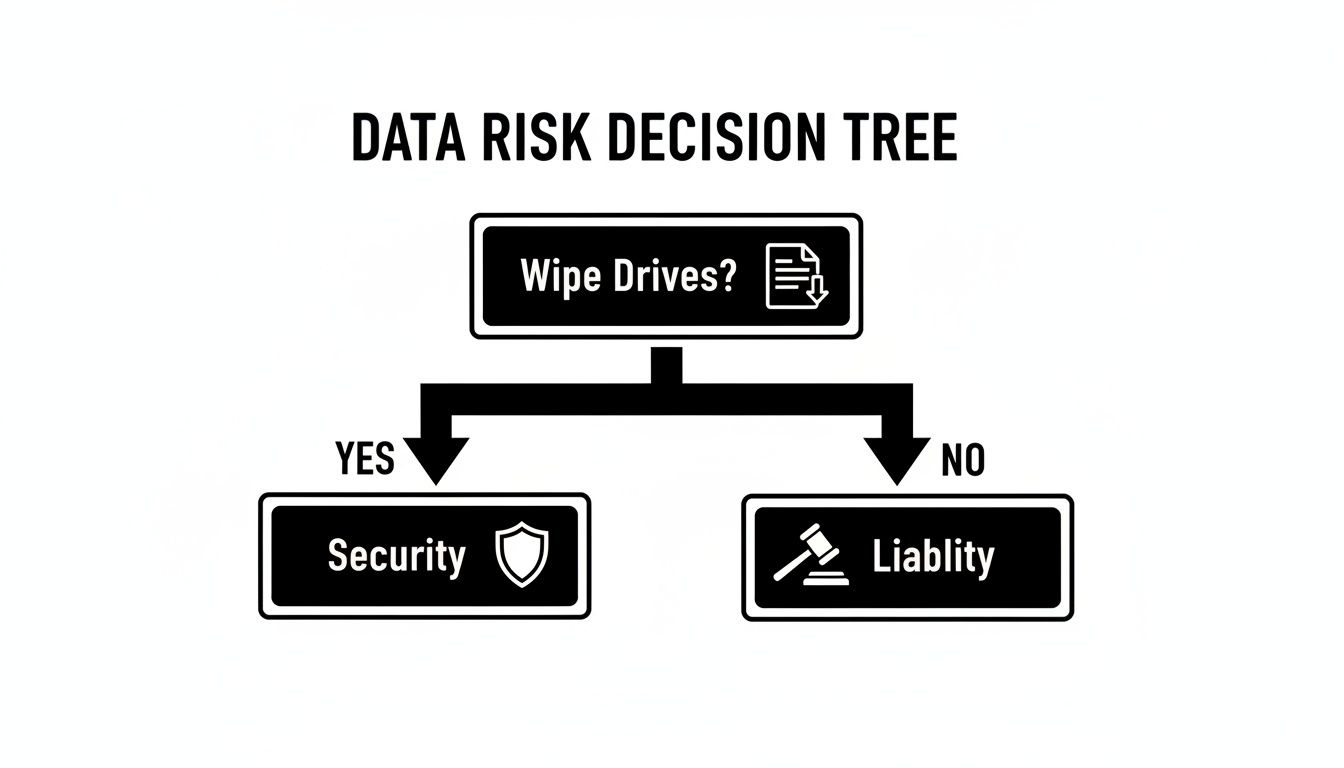
The key takeaway is that inaction is not a neutral choice. Failing to wipe a drive is a direct route to organizational risk.
To help navigate this decision, let's examine the four primary data destruction methods. Each serves a specific purpose, and understanding their differences is crucial for making an informed choice.
Comparison of Hard Drive Wiping Methods
| Method | How It Works | Best For | Allows Reuse? | Compliance Level |
|---|---|---|---|---|
| Software Overwriting | Writes patterns of random data over every sector of the drive, making original data unrecoverable. | Functional HDDs and some SSDs intended for resale or redeployment. | Yes | High (NIST 800-88 Clear) |
| Cryptographic Erasure | Deletes the encryption key on a self-encrypting drive, rendering all data instantly unreadable. | Modern, self-encrypting SSDs and some enterprise HDDs. | Yes | Very High (NIST 800-88 Purge) |
| Degaussing | Exposes magnetic media to a powerful magnetic field, scrambling the data on the platters. | HDDs and magnetic tapes destined for disposal, not reuse. | No | Very High (for magnetic media) |
| Physical Shredding | Grinds the drive into small metal fragments, completely destroying the storage platters or chips. | Damaged drives, high-security data, and end-of-life media. | No | Highest/Absolute |
This table provides a high-level overview, but let's delve into the specific applications for each method.
1. Software-Based Overwriting
For businesses planning to resell, redeploy, or donate IT assets, software-based wiping is the preferred method. This process utilizes specialized software to write patterns of meaningless data (typically ones and zeros) over every sector of the hard drive. While a single pass is often sufficient, many compliance standards mandate multiple passes to guarantee the original data is irrecoverable.
This approach is ideal for functional hard disk drives (HDDs) and some solid-state drives (SSDs) intended for the secondary market. Its primary benefit is that it preserves the drive's functionality, maximizing its resale value. The NIST 800-88 "Clear" standard is the benchmark for most corporate use cases.
It is important to note that this method is only effective on healthy, functioning drives. It cannot sanitize a drive that is physically damaged or has bad sectors where data remnants could persist.
2. Cryptographic Erasure for Modern Drives
Solid-State Drives (SSDs) operate differently from traditional magnetic hard drives. Due to features like wear-leveling—a process that distributes data across the drive to extend its lifespan—standard overwriting software cannot guarantee that it will reach every data block.
This is where Cryptographic Erasure (CE) is essential. Most modern SSDs are self-encrypting by default. CE works by simply deleting the unique encryption key used to secure the drive's data. Without this key, the encrypted information becomes permanently indecipherable, achieving instant sanitization.
This firmware-level command is the manufacturer-recommended method for wiping an SSD. It is incredibly fast—often completing in seconds—and is far more reliable for flash-based storage than traditional overwriting tools.
3. Degaussing for Magnetic Media
When dealing with magnetic storage media like HDDs or legacy backup tapes that are not intended for reuse, degaussing is a highly effective solution. A degausser is a machine that subjects the drive to a powerful magnetic field, which scrambles the magnetic domains on the platters where data is stored.
This process renders the drive permanently inoperable. The data is eliminated, but so is the drive's functionality, making this a disposal-only option. It is a rapid and efficient method for sanitizing magnetic media in bulk, but it is entirely ineffective on SSDs, which do not use magnetic storage.
4. Physical Shredding for Ultimate Assurance
For the most sensitive data, or when compliance standards require absolute, verifiable proof of destruction, physical shredding is the ultimate solution. This is the final and most definitive form of data destruction.
Industrial shredders use powerful steel mechanisms to grind hard drives, SSDs, and other media into small, unrecognizable fragments. This process pulverizes the drive's platters and memory chips, ensuring that no data can ever be reconstructed.
Shredding is non-negotiable in several key scenarios:
- Damaged or Non-Functional Drives: If a drive fails to power on, software wiping is impossible. Physical destruction is the only secure path forward.
- Top-Secret Data: For drives containing proprietary research, classified information, or high-risk financial data, the certainty of shredding is mandatory.
- Strict Compliance: Regulations like HIPAA or internal corporate security policies may explicitly mandate physical destruction for specific data types.
Ultimately, choosing the right method involves aligning your security requirements with an asset's lifecycle. You can explore a full breakdown of options by learning more about professional security and data destruction services. This knowledge will empower your business to make informed decisions that protect your organization comprehensively.
A Deep Dive Into Software-Based Wiping
When IT assets are slated for a second life—through internal reuse, remarketing, or donation—software-based wiping is the standard for secure data sanitization. This method provides an optimal balance between robust security and the preservation of hardware value, making it a cornerstone of an effective IT Asset Disposition (ITAD) strategy.
The core principle of this process is overwriting. Specialized software systematically writes new patterns of ones and zeros over every readable sector of a hard drive. This action effectively buries the original information under layers of digital noise, rendering the old files irrecoverable even with advanced forensic tools.
NIST 800-88 Clear vs. Purge
To standardize data sanitization practices, the National Institute of Standards and Technology (NIST) published Special Publication 800-88. This guide outlines key software-based methods relevant to businesses:
- NIST 800-88 Clear: This is the standard method for most business applications. It employs logical techniques, such as a single-pass overwrite, to sanitize all data accessible through standard user interfaces. This provides a strong level of security against basic, non-invasive recovery attempts and is ideal for assets intended for internal redeployment or sale on the open market.
- NIST 800-88 Purge: For a higher level of assurance, the Purge standard is used. This method is designed to withstand state-of-the-art laboratory recovery techniques. For modern drives, this typically involves Cryptographic Erase (CE), which deletes the drive's internal encryption key, instantly rendering all data unreadable. Purge is the standard for drives that have stored highly sensitive or classified information.
Understanding the distinction is crucial for ensuring your data wiping procedures align with your company's security policies and regulatory obligations.
For any organization handling sensitive data, the mission is simple: make data retrieval impossible. A quick format or deleting files is insufficient. Professional overwriting software is the only way to ensure data is logically erased beyond any practical recovery, which is a fundamental part of proper data sanitization practices.
The Pros and Cons of Software Wiping
The primary advantage of software-based wiping is the preservation of hardware value. Data is sanitized without physically damaging the drive, allowing the asset to be resold, donated, or redeployed. This generates a return on the initial investment and supports a more environmentally sustainable, circular economy.
However, this method is not a universal solution. It is entirely ineffective on drives that are damaged or non-functional. If the software cannot access every sector of a disk due to physical damage, recoverable data fragments may be left behind. In such cases, physical destruction is the only truly secure option.
The Shift to Cloud-Based Wiping
As IT asset management evolves, so do sanitization tools. The disk wiping software market has grown into a USD 1.4 billion industry, projected to reach USD 3.2 billion by 2033. The cloud-based segment is expanding most rapidly, driven by hybrid work models and the need for tools that can wipe devices remotely. This growth is particularly strong in North America, where stringent data privacy laws demand flexible and auditable wiping solutions.
Modern solutions allow IT departments to manage data erasure remotely across an entire fleet of devices. For businesses with remote employees or multiple locations, this capability is transformative. It ensures consistent application of security policies and provides a clear, auditable trail for every sanitized device.
Physical Destruction for Ultimate Data Security
In some cases, software-based wiping is insufficient. When dealing with data that must be rendered absolutely irrecoverable, physical destruction is the only acceptable method. It is the point of no return for a data-bearing asset.
This approach goes beyond simply wiping a computer hard drive; it is about complete obliteration. Once a drive is shredded or degaussed, any possibility of data recovery is eliminated. For high-risk data, this is the definitive final step in the IT asset lifecycle.
Industrial Shredding Explained
Industrial shredding is a powerful process where machinery grinds hard drives, SSDs, and other storage media into small, mangled pieces. This action pulverizes the magnetic platters in an HDD and shatters the memory chips on an SSD, destroying the physical structures that store data.
The result is a pile of metal and plastic fragments. Reconstructing this material to retrieve data is not merely difficult—it is physically impossible. This provides the highest level of security assurance available.
For organizations facing stringent regulatory audits or strict internal security policies, witnessing the destruction firsthand provides a level of assurance that a software report cannot replicate.
This method is the gold standard for assets containing:
- Top-Secret R&D Data: Protecting the intellectual property that is critical to a business's competitive advantage.
- Classified Government Information: Adhering to rigid national security protocols with zero tolerance for error.
- Sensitive Patient Data (PHI): Ensuring full compliance with HIPAA regulations, where a single breach can have catastrophic consequences.
- High-Value Financial Records: Eliminating any chance of fraud or market manipulation resulting from leaked information.
The Role of Degaussing
Degaussing is another form of physical destruction, but it is specifically designed for magnetic media like traditional HDDs and legacy backup tapes. A degausser subjects the drive to an extremely powerful magnetic field, which instantly and permanently scrambles the magnetic alignment of the platters where data is stored.
The result is a completely blank and permanently inoperable drive. It is a fast and effective method for sanitizing large quantities of magnetic drives. However, it is completely useless on SSDs, which use flash memory and contain no magnetic components.
When Physical Destruction Is Non-Negotiable
While software wiping is ideal for devices planned for reuse, certain situations remove that option entirely. Physical destruction becomes the only secure course of action when dealing with:
- Damaged or Non-Functional Drives: If a hard drive will not power on or has sustained significant physical damage, software cannot execute a wipe. This leaves the data in a vulnerable state, accessible to a skilled expert with the right equipment. Shredding is the only way to neutralize this risk.
- End-of-Life SSDs: Although Cryptographic Erase is highly effective, some security policies mandate physical destruction for SSDs that contained top-tier sensitive data as a final, failsafe measure.
- Absolute Compliance Requirements: Certain government contracts and industry regulations explicitly require physical destruction. In these cases, there is no alternative—the drive must be destroyed.
The increasing demand for absolute data security is reflected in the market for destruction hardware. The global hard drive destruction equipment market was valued at USD 1.76 billion and is projected to reach USD 2.56 billion by 2032. This growth is driven by stricter data protection laws and the understanding that nothing offers more certainty than physical destruction. You can explore these market trends in the full hard disk destruction equipment research report.
For businesses requiring this ultimate guarantee, professional ITAD vendors like Beyond Surplus offer certified and auditable destruction services. Our secure hard drive shredding services provide both on-site and off-site options to meet your company's unique security and compliance needs, ensuring your sensitive data is permanently eliminated.
The Critical Role of Verification and Certification
Simply wiping a hard drive is not enough. Without a documented paper trail to prove the action was completed, the process is not legally defensible. A wipe without proof is an unacceptable business risk, leaving you exposed in the event of an audit or data breach investigation.
This final step is about documentation and accountability. It marks the official transfer of liability for the data from your organization to your IT Asset Disposition (ITAD) partner. Without this formal record, your business remains legally responsible.
Understanding the Certificate of Data Destruction
The most important document you will receive is the Certificate of Data Destruction. This is not merely a receipt; it is a legally binding document that serves as your official record of compliance and due diligence. It provides tangible proof that you took all necessary steps to protect sensitive information in accordance with industry standards and government regulations.
A legitimate certificate is more than a simple statement that the job was completed. To be legally sound, it must contain specific, auditable details.
An incomplete or generic certificate offers zero legal protection. For this document to serve its purpose as a legal shield, it must provide a clear and unbroken chain of evidence linking each specific asset to its final disposition.
To be legally defensible, every certificate must include key pieces of information that create an undeniable record of the sanitization process.
Essential Components of a Valid Certificate
When partnering with a professional ITAD vendor, you should demand a certificate that includes the following:
- Unique Serial Numbers: Every hard drive or media device that was sanitized or destroyed must be listed by its individual serial number. This creates a direct, one-to-one link between the physical asset and its certified destruction.
- Method of Destruction: The certificate must clearly state how the data was destroyed. Was it overwritten using the NIST 800-88 Clear standard? Was it degaussed? Or was it physically shredded into 2mm fragments? This detail is critical for compliance audits.
- Date and Location of Destruction: The document should specify the exact date and location where the destruction occurred, whether on-site at your facility or at the vendor’s secure processing center.
- Transfer of Custody: It must explicitly state that custody and liability for the assets have been transferred from your company to the ITAD vendor. This is a crucial legal provision.
- Authorized Signatures: The document must be signed and dated by an authorized representative of the ITAD company, attesting to the accuracy of all information provided.
Why In-House Processes Fall Short
While handling data wiping internally may seem convenient, these processes rarely produce the auditable, third-party documentation that regulators require. A professional ITAD partner provides an indispensable, verifiable paper trail that internal teams cannot replicate.
Maintaining a clear chain of custody—from the moment an asset is collected to its final disposition—is a specialized service. This process is meticulously documented, providing the independent verification needed to protect your business from future claims. You can learn more about the specific standards governing this process in our guide on the importance of NIST SP 800-88 compliance.
Answering Your Hard Drive Wiping Questions
Even with a well-defined strategy, questions often arise when it is time to wipe a computer hard drive. Clarifying these points is key to building a confident and compliant IT asset disposition process. Here are answers to the most common questions from IT managers and business owners.
Is Formatting a Hard Drive the Same as Wiping It?
No. This is one of the most dangerous misconceptions in data security. Believing that formatting a drive cleanses it of data is a critical error.
Formatting a drive only removes the file system's pointers to the data, essentially deleting the "address book" that tells the operating system where files are located. The actual data remains intact on the drive and is easily recoverable with widely available software. In contrast, secure wiping is an active destruction process that overwrites every sector of the drive with random characters, making the original information irretrievable. For any business concerned with security or compliance, formatting is completely inadequate.
Can I Wipe an SSD the Same Way as an HDD?
You should not. Treating a Solid-State Drive (SSD) like a traditional Hard Disk Drive (HDD) during data wiping is a common mistake. Standard overwriting software does not work reliably on SSDs due to built-in features like wear-leveling and over-provisioning. These functions are designed to extend the drive's lifespan but can leave pockets of old data untouched by wiping software.
The correct method for sanitizing an SSD is to use a firmware-based command like Secure Erase or Cryptographic Erase. These commands are built into the drive itself. They either reset all memory cells to their factory state or, in the case of self-encrypting drives, delete the internal encryption key, which instantly renders all data unreadable. For maximum security, particularly with SSDs that have stored sensitive information, physical destruction remains the gold standard.
Think of a Certificate of Data Destruction as your legal shield. It's the auditable proof that you fulfilled your data protection duties under regulations like HIPAA or FACTA. This document officially transfers liability from your company to your ITAD vendor, protecting you from significant fines and penalties in an audit or legal dispute.
Why Is a Certificate of Data Destruction So Important?
A Certificate of Data Destruction is more than a receipt—it is your official proof of due diligence. This document serves as the legal record demonstrating that you complied with data protection laws and took appropriate measures to prevent a data breach.
In the event of an audit or legal challenge, this certificate is your first line of defense. It provides specific serial numbers of the destroyed assets, the methods used, and a clear chain of custody. Without it, you lack verifiable proof of proper data disposal, leaving your organization exposed to significant risk.
Should I Choose On-Site or Off-Site Destruction?
The choice between on-site and off-site destruction depends on your organization's risk tolerance, security policies, and logistical considerations. There is no single correct answer, only the best option for your specific needs.
- On-Site Destruction: A mobile shredding vehicle comes directly to your location, allowing you to witness the entire destruction process. This offers the highest level of security and an unbroken chain of custody, making it the preferred choice for highly sensitive data or when internal policies require visual verification.
- Off-Site Destruction: Your assets are collected, inventoried, and transported in a secure, locked vehicle to a certified, access-controlled destruction facility. This remains a highly secure option and is often more cost-effective, especially for large volumes of equipment.
A reputable ITAD partner will provide a secure chain of custody and the same official certification for both methods, ensuring confidence regardless of your choice.
Contact Beyond Surplus for certified electronics recycling and secure IT asset disposal services that protect your business and ensure compliance. To schedule a pickup or learn more, visit https://eastridgeinfotech.com.